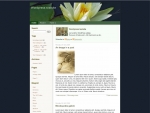
on December 17th, 2004Download : Fleur-De-Lys
This one is for WP 1.2
For the latest version of this theme, go to http://wpthemes.info/fleur-de-lys/
Ok…
We (Myself and Patricia) are very proud of this theme ‘Fleur-De-Lys’.
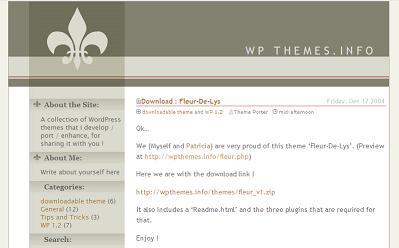
Here is the screenshot
Here we are with the download link !
http://wpthemes.info/themes/fleur_v1.zip
It also includes a ‘Readme.html’ and the three plugins that are required for that.
Enjoy !
Sadish & Patricia



Fleur-de-Lys
Ladies and gentleman, I present you “Fleus-de-Lys”, the newest WordPress Theme from WPThemes.info. This theme was developed by me (design) and Sadish (coding) and is available for download at:
http://wpthemes.info/posts/2004/12/17/download-fleur-d...
I added a screenshot with a link to the WP community at Flickr and also posted about it in topic in the WP community in Orkut.
[...] ;Very Fresh Look… Preview it at http://wpthemes.info/fleur.php and download it from http://wpthemes.info/posts/2004/12/17/download-fleur-de-lys Enjoy [...]
Sadish, are you getting any of my emails? I sent you the images for the other Fleur-de-Lys colorschemes. ;-)
I’m working on moving my MT blog over to Wordpress and I like this theme, but I’m working on some modifications. How do I decease the width of the white stripe on the left? I just want a very thin white stripe.
Thanks.
Hi, Dan,
the left menu uses an image, so you´d have do edit the rap.jpg for starter, but I´ll leave it to Sadish to give you further orientation on this. However, if you edit this image, the left menu won´t be aligned with the top image, leavin you with something more or less like this. (I just rougly stretched it to give you an idea). So, unless you also make changes to the top image, you might end up with a weird looking layout…
Oh, I forgot to mention, you´d also have to edit both fdl_menu_1.jpg and fdl_menu_2.jpg, the images that are used for menu titles. ;-)
Ok…
as Patricia mentioned, this theme doesn’t allow you to change the width of the white stripe, unless you edit those images.
Now that I understand your concern, may be i will try to incorporate such features in the upcoming themes.
I’m still working a bit but here is my new design: http://www.librarymonk.com/blog/
I still need to work on the footer a bit. I have couple of questions that aren’t specific to this theme.
One is how do I get the main page to display something like “This blog has had 136 entries and 96 comments posted since”
And right now Wordpress doesn’t tell people that there comment has been posted. Any ideas on how I can add some sort of notification?
Thanks.
Dan,
Download the Plugins from this website
http://mtdewvirus.com/wp-hacks/
Comment Posted Notification ?
I dunno right now. may be you can post on WordPress Support Forums.
Thanks for using the theme.
Just want to say that I really like your theme and have implemented it on my blog.
However I did break the index file into 4 different files (index, header, sidebar, footer) to make editing a little easier. Hope that was ok.
Hi, Tony,
thanks for letting us know that you´re using the theme and, yes, it´s ok that you split the index into other files, use it however suits you best. I´m glad you liked it.
Is it because I’m a Quebecois? :- ) Your template looks really grreat! But… my question may sound elementary.. how could I use it as a blogsome user? Any hint?
As this theme uses images, you need to find some place to upload them and then update your stylesheet and template (index.php) from our download. and of course, it is a tedious process.
The best thing will be to make it available within the blogsome admin interface, as they provide other templates.
let me contact blogsome site owners and see if something can be done.
That´s a great idea, Sadish. If the folks at Blogsome agree on making it available for their users, it will make things much easier for them (the users).
Another great theme! Keep up the great work
Any plans to release these themes using the new templating scheme in 1.3 and above?
Hello. I’m new to blogging and I’m using your theme in Grape Wine. It’s really simple and clean, which are features I enjoy. I’m not sure how long I will keep it, but for now it’s lovely. Thanks for your efforts on this. It’s very pretty and subtle.
[...] le having a duck on the blog was fun, it’s time for a change. I really like how this Fluer de Lis layout looks. I had to change a few things to accomodate all the stuff [...]
Nice work done on the fleur-de-Lys. It was originally was the symbol of Joan Of Arc of France. Anyways the detail of the work is rather intricate which makes it all the more appealing to look at. A very well done!
Greetings,
I was wondering what is the license of your template, such as CC or GPL. Are we allowed to modify or must use as it is?
Thanks for the info. Your template is lovely.
[...] Angesichts des kurzfristigen Entschlusses nahm ich das Wordpress-Theme Fleur-De-LysIn weiteren Farben ist es hier zu finden: wpthemes.info: Download : Fleur-De-Lys [...]
Does Fleur-De-Lys still work in Wordpress 2.0? It says I am missing a template…
That version doesnt work, but go to this page for a wp 2.0 version.
http://wpthemes.info/fleur-de-lys/
Hiya. Not sure if this is the right place. But I’ll ask anyway. I’m using the WP1.5 Fleur-de-Lys theme, but I’m having a really hard time getting my plugins to show correctly.
It seems that the plugins, wich is on a own php file, doesn’t include the css or the layout of the theme. The addons I’m having troubles with are RumWall and Lazyest-Gallery.
Thanks
Simenfs,
you need to get the latest version of the theme, as found in http://wpthemes.info/fleur-de-lys/.
that will solve your problems.
Thanks.