This is yet another theme site, created by Sadish Bala. Visit his WordPress blog at WordPress Rocks

on March 21st, 2005FastTrack – The Most Wanted !

Winner : Pixel Perfect Design Prize

The latest version of this theme can be downloaded from Fast Track page here in WPThemes.Info

I received so many requests to release the V2 of the GreenTrack.

Finally, I put my time and efforts into it and packaged it into a new theme.

I call it the ‘FastTrack’ v1.0

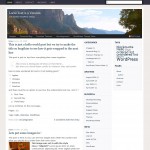
This is how it looks like, on both Internet Explorer and Mozilla Firefox.
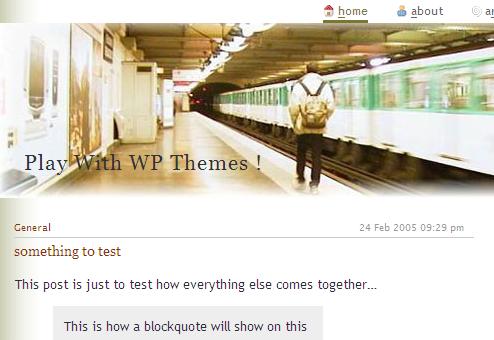
FastTrack screenshot

A live demo is available at playwith.wpthemes.info

and will you leave me, if I forgot to say it is available at this place.
http://wpthemes.info/themes/1.5/FastTrack.zip

and it is submitted to AlexKing’s WP 1.5 Theme Competition

Enjoy !


Update 1:
March 21 2005, 7 40 PM.

Derek from http://www.markfive.net has reported a bug within the single.php file.
It was using a reference to one of my plugins, which wont necessarily be in other people’s configurations. I fixed the problem and uploaded it again.

Please download again to get the fix.
Thanks.
117 Responses to “FastTrack – The Most Wanted !”

  1. [...]here is a brand new theme for download from wpthemes.info. its available at FastTrack Its also submitted to AlexKing’s competition. Check it out ! [...]

  2. [...] WP Themes.info comes a very professional looking theme for version 1.5 of WordPress called FastTrack. Posted by John in WordPress Themes and tagged as wordpress, tem [...]

  3. [...] ht Mechanics Minima Plus by Theron Parlin Shaded Grey, GreenTrack, Fleur De Lys, No LimitsFastTrack by Sadish Balasubramanian Gemini by Stuart Gespaa, Minim8, Gentle Ca [...]

  4. How To Blogon 22 Mar 2005 at 4:02 pm 4

    Comprehensive list of 130 WordPress 1.5 Themes / Templates available for download

    (Last updated: 3/23/05

  5. WordPress Reference Centreon 23 Mar 2005 at 8:06 am 5

    [...] Equix by Marcos Sader Elegant by A Passion for Puters Extra Extra by Lilac Pixels FastTrack by Sadish Balasubramanian Fleur De Lys by Sadish Balasubramanian Fre [...]

  6. mikeon 23 Mar 2005 at 11:31 am 6

    very very nice. thank you! please keep ‘em coming…
    :)

  7. Finchwizardon 23 Mar 2005 at 7:25 pm 7

    I don’t know about anyone else, but I always find the blogs too skinny.

    Can never get a good picture in one of them.

    You should release 2 different sizes, one the normal size, and one that fits just inside of 1024×768 res.

    That’d be champion.

  8. Seanon 25 Mar 2005 at 7:12 am 8

    Hi,

    I used GreenTrack earlier and now i might go for FastTrack. Great themes.

    Just one thing that I do not understand how to do. If I create a page I get the category, created date and comments closed on it. Is it possible by some hack to do so that I get a clean page … with just my title and content?

    Tries to figure it out myself but can’t find the page.php file.

    Would really appreciate some help here :-)

  9. Luke Middletonon 26 Mar 2005 at 10:57 pm 9

    How do I change the picture on the top of the template? How can I change the color of the font up there, also? Is there a way I can change the order of things on the right hand column? Thank you.

  10. Seanon 27 Mar 2005 at 5:54 am 10

    > Luke

    1. The name of the picture is “greentopa.jpg”. It’s located in the “img” folder which is inside the “FastTrack” folder you uploaded to “wp-content/themes”.

    The simple way to do it is to just name your new picture “greentopa.jpg”and upload your new image to the same catalog.

    A “nicer” way is to give your new picture a proper name, upload it to the “img” folder mentioned before and then open your style.css and change name below “#header” in that file.

    2. Open the style.css in the “FastTrack” folder and find “#header h1″. Change color under “color”.

    3. Open the sidebar.php in the “Fasttrack” folder and move around as you want.

    I belive you have to “hack” your files like this to get what you want. But remember to backup every file (like rename it to xxx.old) before you upload the changed file. So that you always got a chance to go back to your last changes if something should go wrong.

    Good luck!

  11. [...] t. 2. Integration. Gallery 1.4.4-pl6 WordPress 1.5 Theme FastTrack 1.0 a: Add a link to your css file to the main ga [...]

  12. [...] 7;s Blog

    胡搞30 Mar 2005 01:08 pm
    換個 theme

    換了新的 theme,看起來也挺有質感的。

    [...]

  13. [...] t. 2. Integration. Gallery 1.4.4-pl6 WordPress 1.5 Theme FastTrack 1.0 a: Add a link to your css file to the main ga [...]

  14. [...] om Draw Prize Winners: Almodovar Greenwood Pixel Perfect Design Prize Winner: rdc Theme FastTrack Most Versatile Design: Zen Minimalist Sharepoint Like LetterHead Man [...]

  15. The Roost » Good Tasteon 04 Apr 2005 at 6:14 pm 15

    [...] d! WordPress 1.5 Themes Pixel Perfect Design Prize Winner rdc* Theme FastTrack Congrats!

    Leave a Repl [...]

  16. Aaronon 07 Apr 2005 at 7:15 pm 16

    Let me say first, I love this theme – great job, Sadish! I’m having some trouble working with the WP links/categories function (in other words, no category or differentiation between links is showing up – just all of my links put in one column) – is there something I need to tweak in the style sheet?

  17. davenyon 08 Apr 2005 at 10:10 am 17

    Hi all!
    I installed FastTrack design in my blog and it gives me this error when I reload the page:

    Warning: main(): Unable to access post.php in /disk/raid0/d/a/daveny/wp-content/themes/FastTrack/index.php on line 24

    Warning: main(post.php): failed to open stream: Permission denied in /disk/raid0/d/a/daveny/wp-content/themes/FastTrack/index.php on line 24

    Fatal error: main(): Failed opening required ‘post.php’ (include_path=”) in /disk/raid0/d/a/daveny/wp-content/themes/FastTrack/index.php on line 24

    Why this FastTrack doesn’t want to work for me?

  18. Theme Porteron 08 Apr 2005 at 10:20 am 18

    daveny :

    It is something to do with your hosting machine and the file permissions for the post.php file inside the theme folder.

    Please make sure you have the same permission for this file as you have for index.php in the same folder.

    Aaron :
    It is something to do with the way we call the get_links method. We need to add additional parameters. Please contact me offline at the email sadish @ simpleinside. com

    Thanks.

  19. davenyon 08 Apr 2005 at 1:39 pm 19

    I gave 666 attributes to post.php but I got the same results. What shall I do next?

  20. davenyon 08 Apr 2005 at 2:10 pm 20

    Now I tried 777 too but I got the same results.
    I changed index.php and post.php to 777.

  21. Theme Porteron 08 Apr 2005 at 3:24 pm 21

    daveny,

    I sent you an updated version of the theme, please try it out.

    Thanks.

  22. shevy.dk » Nyt design … igenon 11 Apr 2005 at 8:32 am 22

    [...] er det nu implementeret lidt tidligere end planlagt. Jeg har bygget det op om de to temaer FastTrack og Connections fra WP Themes.info. Topbanneret (som følger med FastTr [...]

  23. perfect 10 » First Poston 11 Apr 2005 at 11:10 am 23

    [...] f myself as passionate! So my husband helped me set up a webblog using WordPress with the FastTrack theme, though we obviously changed the photo to this one of Nadia Coma [...]

  24. kpon 13 Apr 2005 at 1:47 am 24

    Love the look of Fasttrak, one of the best lookin g templates out there! However, I am having a terrible time implementing some plugins, such as Simple Gallery, http://relativelyabsolute.com/spg/, that I can easily drop in with other templates. Any suggestions?

  25. Ryanon 21 Apr 2005 at 12:11 pm 25

    If the bullet in front of the Pages header in the sidebar bothers you as much as it did me, placing

    #sidebar li#pagenav {
    list-style-type: none;
    }

    in the stylesheet will turn it off.

    Not sure why it didn’t happen in the first place, but hey – I’m happy I was able to get rid of it easily.

  26. Theme Porteron 21 Apr 2005 at 3:53 pm 26

    That is the quick way to solve this problem.

    I am waiting for some update to happen to the wp_list_pages method of WP, and then it might be solved more precisely. till then Ryan’s method will be helpful.

    Thanks Ryan.

  27. Randyon 01 May 2005 at 7:08 am 27

    The links at the top do not seem to work. Where do I set the contact information for the contacts link?

  28. brianon 02 May 2005 at 5:33 pm 28

    The theme looks amazing. I am just having one problem– the top header picture doesn’t load in internet explorer. http://neroband.com/brianblog/ . Please help!

    -brian
    brian@neroband.com

  29. brianon 02 May 2005 at 6:08 pm 29

    correction – it loads on internet explorer on WINDOWS but not on IE for mac. What’s the deal?

  30. [...] t. 2. Integration. Gallery 1.4.4-pl6 WordPress 1.5 Theme FastTrack 1.0 a: Add a link to your css file to the main ga [...]

  31. razzion 04 May 2005 at 5:25 am 31

    Great theme! – I’m currently using it (for an upcoming new website). Just a small question – What is the use of

    on top of the templates (just before: )

    Is this necessary?

  32. razzion 04 May 2005 at 5:27 am 32

    retry (some parts got stripped away):

    Great theme! – I’m currently using it (for an upcoming new website). Just a small question – What is the use of

    php wp_get_archives(’type=monthly&format=link’)

    on top of the templates (just before: php wp_head();

    Is this necessary?

  33. Theme Porteron 05 May 2005 at 11:44 pm 33

    Razzi,

    Very Interesting question.

    these links are not really necessary for the actual users of the site. However it lets the search engines to know that an archive page for each month is available at the that URLs.

    some search engines do cache them as well, and thats why you see some search engine results show the permanent links to individual months as well.

    Hope that helps. :) (learnt all these from http://wordpress.org/support/topic/32874 )

  34. Ryanon 12 May 2005 at 5:29 pm 34

    Well 1.5.1 changed the mysterious bulleted Pages section header from an ID to a class, so

    #sidebar li.pagenav {
    list-style-type: none;
    }

    is the updated “hack your css to get rid of the bullet” entry I needed in my style.css

  35. MilMazz » Cambio de Temaon 15 May 2005 at 6:33 am 35

    [...] tema del sitio, mientras me propongo en realidad a crearme el mío, he hecho uso del tema FastTrack de WP Th [...]

  36. Hahnon 21 May 2005 at 6:10 pm 36

    When I assign URL’s to the links in the top navigation, the active page doesn’t underline. ‘About’ for example doesn’t underline, instead the “Home” does. How do I fix this?

    Thanks! Love the theme by the way.

  37. Paulon 25 May 2005 at 11:02 am 37

    I really like your themes and had a really hard time figuring out which one to use but I eventually settled on this one for my site (www.digitalstakeholders.org). As I am new to WordPress I am trying to figure out how to use the archive feature. According to the instructions in the Wiki, I need to use a template file called archive.php, but I did not find it included in the template. Can I use another theme’s archive.php? I don’t want to mess it up.

    Thanks and keep up the great work. I will be checking here often!

  38. [...] Extra!  Fading Flowers Fall-In-Love NEW Falling Dreams NEW Falling Leaves NEW FastTrack Fleur De Lys NEW Flex NEW Flippin’ Sweet! ForumED Framef [...]

  39. podCast Torrent » Header Graphicon 08 Jun 2005 at 11:04 pm 39

    [...] tle, but not enough to matter anytime soon. Many thanks to Sadish Balasubramanian for the FastTrack WP Theme. Next step will be writing the WP plugin for uploading and d [...]

  40. Markon 24 Jun 2005 at 3:37 pm 40

    I need to edit the comments template..but there is no comment’s template?? How is that possible? And where is it?? Thanks.

  41. Sy41fulon 25 Jun 2005 at 6:11 am 41

    i have using fasttrack theme for my blog..

    i have problem with wp-stats.php by GameZ.

    u can see here: http://www.sy41ful.weblogscenter.com/wp-stats.php

    how i can slove this problem..??

    Please help me…

  42. [...] emang tak pernah aku buat sebelum ni Ok sebenarnya theme yang aku guna sekarang ni theme FastTrack yang kala hijau tu aku modif ngan kala grey pastu aku tambah sikit dan [...]

  43. antokjabrikon 28 Jun 2005 at 7:43 am 43

    Aku juga pakai theme yang ini untuk website berita…Hehehehe, emang keren kok.

    Mungkin bisa ditambah satu kolom lagi untuk sebelah kiri deh..

    Maybe, there’s new design with 3 collums.

    thanks dud!!!

  44. claudia6913on 30 Jun 2005 at 5:57 pm 44

    When I try to leave a comment, or go to a “page” the main body background disappears and this error shows:

    Warning: comments_template(/home/.gash/claudia6913/soapbox.vampyrehaven.net/wp-content/themes/default/comments.php): failed to open stream: No such file or directory in /home/.gash/claudia6913/soapbox.vampyrehaven.net/wp-includes/comment-functions.php on line 28

    Warning: comments_template(/home/.gash/claudia6913/soapbox.vampyrehaven.net/wp-content/themes/default/comments.php): failed to open stream: No such file or directory in /home/.gash/claudia6913/soapbox.vampyrehaven.net/wp-includes/comment-functions.php on line 28

    Fatal error: comments_template(): Failed opening required ‘/home/.gash/claudia6913/soapbox.vampyrehaven.net/wp-content/themes/default/comments.php’ (include_path=’.:/usr/local/lib/php’) in /home/.gash/claudia6913/soapbox.vampyrehaven.net/wp-includes/comment-functions.php on line 28

  45. Sreejithon 01 Jul 2005 at 12:35 pm 45

    Sadish i always like u`r theme`s from the green track to this , u got a cool taste man !

  46. lucason 07 Jul 2005 at 2:49 pm 46

    the title always displays “about me” instead of the title of my blog. what’s going on?? help?

  47. Michaelon 11 Jul 2005 at 4:13 pm 47

    I’ve just downloaded FastTrack and am using it on WP 1.5.1.3 over all the theme looks great however when I click on a blog entry to see just that entry the page loads just fine but above the entry and below the header image I’m giving the follow error:

    Search Results for ”
    Did you find what you wanted ?

    Any suggestions as to why this would be happening?

    -Michael

  48. Theme Porteron 11 Jul 2005 at 5:41 pm 48

    lucas,

    your website first shows your website title, and then it changes to ‘about me’
    The Javascript that you included “http://www.myfourwalls.net/about/pages.js” overrides the title
    It is not something done by our theme.

    Michael,

    Please provide me with your website’s URL.
    We will check it out.

  49. Johnon 13 Jul 2005 at 2:37 am 49

    I’m very new to all of this, but am having fun, along with a little frustration, learning how to get my wp blog set up with the FastTrack theme. I have to echoe the question of Randy above. How you you get the links at the home page to work?

    Thanks for the great themes!

  50. Johnon 13 Jul 2005 at 2:38 am 50

    In my question above, I meant to ask, “How to you get the links at the *top* of the home page to work?”

  51. Johnon 14 Jul 2005 at 2:40 am 51

    Okay, to a large degree I’ve figured out the answer to my question above. I’m a beginner at this, but did remember from some experience with older discussion forums the trick of peeking at page source to see how someone else uses html to achieve some effect. So I started doing that with some FastTrack themed blogs (googled “Design Downloaded from WPThemes.Info” :) Amazing how few FastTrack and Connections users have those top links working :( ), found the code in the header template, and now have the “about” and “contact” links doing what I want. “Links” should be easy enough too. “Archives” I’m a little less clear on, but will figure it out.

  52. Anderson 25 Jul 2005 at 1:26 pm 52

    Hey John can you describe how you got the topnav to work. I have tried to work with header.php, but nothing really works

  53. [...] dified FastTrack theme

    The theme that is displayed currently on my blog is one called FastTrack that won the pixel perfect award in Alex King’s Theme Competitio [...]

  54. christinaon 09 Aug 2005 at 10:32 am 54

    I love the simple clean lines of the fastrack theme… but one thing is really bugging me. The margin between the post content and the sidebar is really small. How can I increase this margin? And/or increase the overall whitespace available for text? Hope that makes sense–I’m pretty darn new to the whole blogging thing and am jusssst learning css. Where to look? What to do? Some help would be sooo appreciated.

  55. [...] d LiewCF’s Three Columns Kubrick Theme as a base and also pulled elements from the FastTrack theme for the top navigation buttons. Here is a screenshot of the the [...]

  56. Michaelon 21 Aug 2005 at 9:21 am 56

    We like Fasttrack very much and have used it to set up a friend’s website. However we have been unable to get lazy-gallery to work with it. We, unfortunately, don’t seem to be familiar enough with php to get the gallery to display properly. (although we know the plugin is installed properly as it works in the default [boring] theme)

    The gallery is at http://www.baelor.com/lazy-index.php

    Any advice would be welcome. :)

  57. Chrison 24 Aug 2005 at 11:50 am 57

    I’m using Fasttrack to manage a site for a friend:
    http://www.cebulawyer.info/

    …it’s VERY NICE but I want to change the color in the side margins from that dark green. I’ve been thru style.css and the other files several times (practically with a magnifying glass!) yet I can’t figure out how to change the color… Suggestions? Thanks….

  58. Theme Porteron 24 Aug 2005 at 2:47 pm 58

    @Chris

    /wp-content/themes/FastTrack/ img/contentbg.jpg is the one that gives the side margin.
    Edit this file to look like what you want.

    @Michael
    Your issue is more to do with the way header.php file is arranged in the FastTrack theme.
    I think it needs more complex explanation, that I might provide you in an email.

    Thanks

  59. Michaelon 27 Aug 2005 at 9:31 am 59

    Wonderful. thank you very much. :)

  60. Marqueon 27 Aug 2005 at 10:52 am 60

    Hey, I love using your theme, and I think it is the best out there, the only flaw though, is that it doesn’t have an archives page…do you have an archives page I can use for it? I need it badly.

  61. Johnon 28 Aug 2005 at 4:09 pm 61

    Anders,

    Sorry for the delay. I was offline, on vacation for a few weeks.

    Anyway, I suspect you could approach the links at the top in a few ways, but here’s what I’ve done. They are links and can be found in the header template by going in your WP admin panel to presentatoin–>theme editor–>header template. There, see for instance the code for the “About” link where you find this text: a href=”#” id=”navAbout” title=”About the Author” accesskey=”a”

    That’s the link so you replace it with the actual link you want to use. For “About” I just created an about “page” (write–>write page in the admin panel). So the link to it is like: a href=”http://www.name of site.org/wordpress/?page_id=14″ id=”navAbout” title=”About the Project” accesskey=”a”

    The title of the link etc is in there too.

    For the “Links” link I did the same thing – created a page because I wanted to provide a “comprehensive links” page anyway. If you don’t want that, you could actually eliminate it or turn it into a link to something else.

    For the “Contact” link, I turned it into something like this: a href=”mailto:john[at-sign]nameofsite.org” id=”navContact” title=”Contact the Author” accesskey=”c”

    I haven’t yet looked into how to handle the “Archives” link.

    Hope that helps and shows up correctly in the post. :)

    John

  62. MaryJaneon 29 Aug 2005 at 10:08 pm 62

    Hello, I love your fast track theme. Great job on it. I recently added the gravatar plugin and im having a bit of trouble getting the avatars to place where i want them. I noticed the comments are numbered in order of post i want to leave that but it seems as if my avatar overtakes it. Ive been messing with it and cant seem to get it fixed. Can u give me some input on this please.

  63. MaryJaneon 29 Aug 2005 at 10:35 pm 63

    Ok never mind i fooled with it till i finally got it working like i wanted. I was trying to use the same code that Skippy had posted in the comments.php page. After changing that a some other things i got it like i want it. Nice design i love it.

  64. Black Abyss » Blog Archive » Checaron 02 Sep 2005 at 4:30 pm 64

    [...] ing Posts Here is a brand new theme for download from wpthemes.info. its available at FastTrack Its also submitted to AlexKing’s competition. Check it out ! ( [...]

  65. Ralphon 15 Sep 2005 at 6:55 pm 65

    Just downloaded and installed your FastTrack theme. Very impressive. I have found a bug though :(

    When you have pages created and the “PAGES” subsection of the sidebar is visible, a bullet point also becomes visible next to the header. I’ve had a bit of a dig through the code, but I’m not that experienced I’m afraid and can’t see how to get rid of it :(

    Ralph

  66. Ralphon 15 Sep 2005 at 7:18 pm 66

    Forgot to add: Ryan’s css fix doesn’t seem to work.

  67. Ralphon 15 Sep 2005 at 7:22 pm 67

    Sorry for the multiple posts:

    The fix in the end was very similar to Ryan’s post, only difference was that a comma was needed to separate “li” and “#pagenav”.

    So:

    #sidebar li, #pagenav {
    list-style-type: none;
    }

  68. christinaon 22 Sep 2005 at 9:39 pm 68

    Hi, I’ve been using the fastrack theme for a while now…and can’t figure out how to change the “links” to something else–or to have more than one set of links, if that makes sense–Link categories? Please Help! Thanks so much,
    Christina

  69. Theme Porteron 23 Sep 2005 at 10:39 am 69

    Hi Christina,

    For the Pages thing, try this
    <h2>Pages</h2>
    <ul><?php wp_list_pages(’title_li=’ ); ?></ul>

    For the links problem,
    try this,
    <h2>All Links</h2>
    <ul><?php get_links_list(’name’); ?> </ul>

    Thanks.

  70. inTheBasement()on 24 Sep 2005 at 12:52 pm 70

    new appearance

    So I’ve been playing around with WordPress themes ever since I upgraded to version 1.5. I finally settled on FastTrack from the kind folks at wpthemes.info.
    I’ve modified the stylesheet a bit, and made some minor tweaks to the layout, …

  71. [...] e auffälligste Änderung ist wohl das neue Design, ich habe mal wieder ein Theme (FastTrack) von WP Themes.info benut [...]

  72. Michaelon 29 Sep 2005 at 2:41 pm 72

    Hello,

    I was wondering if you had a solution from the my issues with Lazy Gallery. In a previous post you noted it was an issue with the header.php.

    Any tips?

  73. SilverMastaon 30 Sep 2005 at 11:01 am 73

    Just one of the best themes for WP, thanks a lot, and goodluck

  74. denyon 02 Oct 2005 at 6:51 pm 74

    Sadish i always like u`r theme`s

  75. leibniz » L’indirizzo ce l’hoon 06 Oct 2005 at 5:31 am 75

    [...] ve; archiviata, mentre il template è un riadattamento smanettone del Fast-Track in attesa che il titolare qui abbia voglia di crearsene uno in propri [...]

  76. Wild Tangents » New site designon 22 Oct 2005 at 11:19 pm 76

    [...] t an available design that was already out there and modify it. I got the original design here. Thanks guys! I still have some tweaking to do, but th basics are there. [...]

  77. Xuanon 05 Nov 2005 at 1:24 am 77

    Thanks for the help on removing the bullet point i got from here. Had me scratching my head for endless hours and i still don’t understand why it comes up in the first place…

  78. [...] Gallery & Fasttrack Theme Das die Gallery und das Theme nicht zusammenspielen, liegt nicht an Lazy-Gallery sondern an [...]

  79. [...] hme auch keine Garantie falls bei euch was schief läuft! Das die Gallery und das Theme nicht zusammenspielen, liegt nicht an Laz [...]

  80. Darrenon 18 Nov 2005 at 3:07 pm 80

    Hi,

    I’ve been setting up your template for my new blog and I’m very impressed.

    It looks great in Firefox and Opera, but I’ve noticed the font size increases enormously when viewed under IE6.

    I’ve tried out a few links from other users of your theme, and they have the same font issue under IE.

    Do you have any idea what’s causing this? It’s a great theme and I’d love to use it, but if IE can’t display it correctly I won’t be able to.

    Thanks
    Darren

  81. Darrenon 18 Nov 2005 at 3:26 pm 81

    Problem solved, so I get to use your cool theme after all!

    The issue only arose when IE had Text Size set to Largest. If this is the case, the site becomes unreadable. Changing the body font-size from 0.9em to 90% fixed the problem.

    You may want to look at this, as a large font size in IE is common across large monitors. Not that I’m an IE user of course – Firefox rules.

    Anyway, thanks for a great theme!

    Darren

  82. Ronnie Williams (.net)on 19 Nov 2005 at 8:59 am 82

    [...] ess Yourself Extra! Extra! Fading Flowers Fall-In-Love Falling Dreams Falling Leaves FastTrack FireFox Theme Fleur De Lys Flex Flippin’ Sweet! Follow Me [...]

  83. Gobboon 25 Nov 2005 at 3:19 am 83

    I kept coming back here to see if anyone had answered Anders up above. In the end, I gave up trying to get the header navigation working (the underlines wouldn’t cooperate, etc.), and just stripped out the ul id=”topnav” from header.php. I feel much better now.

  84. My Life and Times » The Siteon 26 Nov 2005 at 4:43 am 84

    [...] a SQL database from MySQL 4. I am using the wordpress theme FastTrack which can be found Here. For the gallery I have chosen to use a nifty piece of software from Lussu [...]

  85. harry45on 09 Dec 2005 at 1:23 am 85

    in the fasttrack theme where do can I edit the line “Mail (will not be published)” in the comment form to something like “email address : ”

    sorry if this is a stupid question

  86. Theme Porteron 09 Dec 2005 at 8:46 am 86

    It is actually in the comments.php.

    If it is not found in the FastTrack folder, then copy the comments.php file from the default theme and paste it inside the FastTrack folder.

    Now edit this comments.php and do whatever you want.

    Thanks

  87. harry45on 10 Dec 2005 at 10:18 am 87

    ok thanks it worked :-)

  88. Gobboon 12 Dec 2005 at 3:05 pm 88

    Well, several graphic and colour variations later, I have a small blog functional using fasttrack at http://whatididlastsummer.com. Thanks! I’m much more comfortable tweaking this theme after clearing out the top header navigation… next is to snug the banner image flush with the top.

  89. tomon 21 Dec 2005 at 4:04 pm 89

    i love the fasttrack theme. nice work!

    i am not able to figure out how to configure it so that each post includes the author’s nickname (at the top or bottom of each post). can anyone help me with the code i need to get this working? thanks.

    http://tomanddonna.net to see how i’m making the most of fasttrack…

  90. tomon 21 Dec 2005 at 5:27 pm 90

    no more worries re: my question about getting author names included with entries! i took some code from minima and inserted in at the bottom of fasttrack’s post.php file and it works beautifully.

    i’m using fastrack on 2 blogs, http://tomanddonna.net and http://www2.iteams.org/~albinst/1934/

  91. Theme Porteron 21 Dec 2005 at 6:49 pm 91

    <?php the_author() ;?> will get the author name to show up on the post.

  92. srinathon 26 Dec 2005 at 3:36 pm 92

    nice theme ! thx for it

  93. Joachimon 03 Jan 2006 at 4:56 pm 93

    I am having the exact same problem as Daveny is descriping in this thread:

    Warning: main(): Unable to access post.php in /disk/raid0/d/a/daveny/wp-content/themes/FastTrack/index.php on line 24

    Warning: main(post.php): failed to open stream: Permission denied in /disk/raid0/d/a/daveny/wp-content/themes/FastTrack/index.php on line 24

    Fatal error: main(): Failed opening required ‘post.php’ (include_path=’’) in /disk/raid0/d/a/daveny/wp-content/themes/FastTrack/index.php on line 24

    I have changed file permission forth and back – nothing helps.
    What’s the story on the updated version of the theme sent to Daveny?
    I have a client who crave this theme for it’s beauty :)

  94. SPBon 04 Jan 2006 at 12:53 pm 94

    Hello,

    Love the look of the theme. How am I able to make it so when you click on a category, you get a list of all the post headlines? (linked to each post) instead of just taking you to the first post in that category?

    Including a brief description would be great too, but I’ll settle for a list of all posts.

    Any kind of table of contents or overview so folks can scan post titltes and select one to read.

    Am i overlooking something obvious here?

    thanks so much for any help.

    SPB

  95. Theme Porteron 05 Jan 2006 at 12:43 pm 95

    SPB,

    You might edit the category.php to do what you want.

    1. look for the line that include post.php inside the category.php., something like <?php include(’post.php’) ;?>
    2. replace this line, with the actual contents of post.php, found within the same folder.
    3. look for <?php the_content() ;?> , now in the category.php
    4. replace ‘the_content’ with ‘the_excerpt’, which will show only the excerpts from that post.
      or you can remove the whole line if you do not want to display anything.

    Hopefully this solves your issue. or let me know if you face any problems.

  96. dennison 07 Jan 2006 at 10:36 pm 96

    How can I change the sides of the theme? Because I wanna change them from brown-ish or whatever they are to orange. Could anyone help?

  97. SPBon 08 Jan 2006 at 12:07 am 97

    Hi,

    Thanks for your help. Your suggestion has me in the right direction, but didn’t solve the problem.

    Now when you click on a category you get an excerpt of the first post in that category.

    What I am looking to do is when a user clicks on a category (or sub catecory) they see a long list of all the posts titles in that category. (with each post title linked to that particular post).

    This would be a way to browse all the posts in a category on a single page. Like a table of contents. make sense?

    let me know your thoughts. thanks!!!

    SPB

  98. donon 21 Jan 2006 at 2:16 am 98

    LIke so many of your fans I love your template. I do have a few questions for you though. Everything is working fine for me and I even was able to get rid of the line to work below the home button from the top menu strip. I am not sure why it is underlining all the time but it bugged me. Now it works like the rest of the buttons and is there only when you mouse over it.

    I have not had the same success with the bullet next to my “current topics” I have tried both fixeds posted and although the scond one with the comma works when I maker the change, it reverts back after I have viewed the page. Ugh! Help!

    I would like to add subscribe that informs registered members when a new post has occured and a calendar but am not sure what plug in to use. Any help would be appeciated.

    Finally, if I want to change the background for the Blog

  99. donon 21 Jan 2006 at 2:17 am 99

    BTW, my blog is http://www.freerangemovies.com/blog

  100. The Huns » WordPress From The Hunson 23 Jan 2006 at 1:27 am 100

    [...] FastTrack [...]

  101. Hanson 30 Jan 2006 at 11:23 pm 101

    Hi,

    thank you for your nice design. It perfectly matches what I want to express.

  102. sunnyon 05 Feb 2006 at 9:32 am 102

    which is the comment.php file in this theme? comment.php doesn’t show up all.

    I need to place some code in comment.php, if not there then where to place?

  103. Theme Porteron 05 Feb 2006 at 10:15 am 103

    sunny.

    just copy the comments.php file from your default theme.

    http:// yourblog / wp-content/ themes / default / comments.php

    just copy this file and paste it into your FastTrack folder and then make changes to it.

    Thanks.

  104. [...] FastTrack [...]

  105. Luke Middletonon 26 Feb 2006 at 3:17 am 105

    Any ideas how to, in this theme, make category pages show only excerpts and titles (with necessary link)?

    Also, I used to be able to view (while logged-in as admin) private posts on the front page. Now I get a “no posts match your criteria” thing when I attempt (while logged-in as admin) drafts or private posts. I’m wondering if while messing with code the other night I botched something. Any ideas? Where can I get the original the post template and post-script.php in case I’ve done something stupid?

    Greatly appreciated. Thanks for your time.

  106. Luke Middletonon 28 Feb 2006 at 12:11 am 106

    Scratch the excerpt thing…I did what you told the previous commenter to do. Had trouble finding “include”, but realized what you were talking about. But, I’m still confused as to why I’m getting “sorry, no posts matched your criteria” when attempting to view private posts or drafts from the main page (even when clicking on “view” a private post from the “manage” tab). Any ideas anyone?

  107. Theme Porteron 28 Feb 2006 at 12:54 am 107

    I have not seen anyone complaining about the draft page not showing up error.

    It is not with the theme. It is something else with the environment where your web server is running.

    did you try the wordpress.org forum ?

  108. [...] FastTrack [...]

  109. Sunnyon 07 Mar 2006 at 3:28 pm 109

    I am getting a error during the xtml validation, plz help me!

    Sorry, I am unable to validate this document because on line 6, 440-441 it contained one or more bytes that I cannot interpret as utf-8 (in other words, the bytes found are not valid values in the specified Character Encoding). Please check both the content of the file and the character encoding indication.

  110. Sadishon 07 Mar 2006 at 7:31 pm 110

    Sunny.
    Can you let me know your website URL so I can take a look at it ?

    Thanks
    Sadish

  111. Jameson 30 Apr 2006 at 4:05 pm 111

    Hey,

    I used your theme as my first attempt on a blog and it looks great! You did a great job with it.

    I have one question tho.. can the color of the title be changed? The black text is hard to see when it’s overlaid on the train tracks area on the pic.

    I tried editing the color in the style.css file – namely under the “#header h1″ section but it did not take.

  112. [...] Our Connections theme has won the Grand Poobah Prize., and the FastTrack theme has got the “Pixel Perfect Design Prize Winner” (thanks to Paul Javris). [...]

  113. a gecko’s tale » Why this theme?on 02 Jul 2006 at 12:07 pm 113

    [...] Since the beginning of this wordpress blog, I have stuck with this FastTrack theme created by Sadish. It was the winner of the Pixel Perfect Design in Alex King’s Wordpress 1.5 Themes Competition back in March 2005. [...]

  114. Bill Ernoehazyon 20 Jul 2006 at 1:38 pm 114

    Sadish:

    Your FastTrack theme is the basis for the design of Voices/Future Tense, an ezine for transhumanist science fiction and the Orion’s Arm project.

    The latest edition is here; you will find yourself credited in the colophon.

    I hope you enjoy what we’ve done with the ezine — there’s some excellent stories there…

    cordially, Bill

  115. What KNot » Server Change Blogon 20 Aug 2006 at 7:05 pm 115

    [...] So in less than 5 minutes I had setup a WordPress blog at the office to track all the server/network changes. I created categories for each office, then sub-categories for each server or thing that I wanted to track in particular. All my staff created accounts and will now be recording all network and server changes in the blog. Simple, fast, and elegant. I lightly modified the FastTrack theme which I downloaded. I picked this one because it showed the category first then the title, which worked well for our implementation. [...]

  116. mjvfoason 18 Oct 2006 at 4:40 pm 116

    Hi! uozv
    it is good site: http://www.heretohim.com/map.html
    bwokh http://www.heretohim.com/map.html

  117. Casey - linux web hostingon 24 Dec 2006 at 12:30 pm 117

    Well itz really awesome, and you have done a wonderfull job, keep up the good work

Premium WordPress Themes