This is yet another theme site, created by Sadish Bala. Visit his WordPress blog at WordPress Rocks

on January 9th, 2005GreenTrack - First WP 1.5 Theme

Please go to http://wpthemes.info/green-track/ and grab the latest version.

Yes !

WPThemes.Info is releasing its first WP 1.5 Theme…

Here I am presenting you a new theme called ‘GreenTrack’.

There are various WP Themes, from there I got the inspiration and sometimes the ‘code’ ;)
I would like to mention Kubrick of BinaryBonsai.com and Benevolence of ThoughtMechanics.com

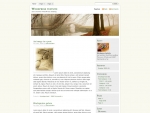
Here is a screenshot of the GreenTrack.
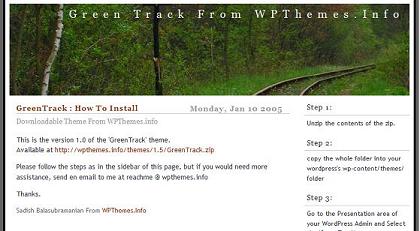
GreenTrack Screenshot goes here

You can see it online at http://playwith.wpthemes.info

Click on the link below to download it and let me know if you face any issues in installing it.
http://wpthemes.info/themes/1.5/GreenTrack.zip
This Theme includes the MainTemplate, Category Template, Date Template, Single Template and Search Template. It also includes a Readme.html to show you how to install it.

You are free to do any customizations and make it your own !

Thanks.

Update 1 :

Fix for the Single.php problem.
Fatal error: Call to undefined function: the_text_category() in /wp-content/themes/GreenTrack/single.php on line 47

Solution:
Please Change the “the_text_category()” to “the_category(’ & amp ;’)”
but no spaces in between & and amp;

Update 2 :
I fixed it in the package itself. You can download the package now to get the fix.
Thanks to the people who reported it, both here and also to my email.

Thanks
84 Responses to “GreenTrack - First WP 1.5 Theme”

  1. WordPress Theme: GreenTrack

    GreenTrack is the first theme released by WP Themes.info….

  2. [...] LinkyLoo — sadish Here comes the first ever WP 1.5 Theme from WPThemes.Info. GreenTrack Enjoy. &nb [...]

  3. trenchon 09 Jan 2005 at 7:10 pm 3

    Im a big fan of your themes because of its simplicty. I hope you release the blue theme as well, and perhaps update your older themes. I would like to use the switcher with these. Really great job! Thanks.

  4. Another Day Closeron 09 Jan 2005 at 9:23 pm 4

    New Theme In Action
    I’ve just installed a new theme from WP themes.info called GreenTrack.

    I do like the nice clean look, but there are a few things I need to add to make it truly mine. So if you will excuse me I have some costumizations to make….

  5. wordlog.com » New Theme: GreenTrackon 10 Jan 2005 at 12:44 am 5

    [...] 005

    New Theme: GreenTrack
    Filed under: Design — Carthik @ 8:43 pm

    GreenTrack is a theme that includes a Main Page Template, Category Template, [...]

  6. 0xid0on 10 Jan 2005 at 2:50 am 6

    In the comments, in the block of the right receipt this error:

    Archived Entry
    Post Date :
    Jueves, Ene 6th, 2005 at 11:18 pm
    Category :

    Fatal error: Call to undefined function: the_text_category() in /home/nidr0x/public_html/wordpress/wp-content/themes/GreenTrack/single.php on line 47

  7. Scotton 10 Jan 2005 at 9:41 pm 7

    Nice work Sadish, I’ve been using a modified Manji theme for my
    site. Manji does not use any menu bar I think I’ll give yours a
    try.

  8. trenchon 12 Jan 2005 at 1:12 am 8

    thanks for the fix. I thought it was just me getting the error.

  9. Vanilla Mist » Updateson 13 Jan 2005 at 6:56 am 9

    [...] nwhile, he released another one on his own called Green Track. I love it! Download it from here. This week I got Kat´s late Christamas gifts in the mail. She and Rya [...]

  10. David Hewsonon 18 Jan 2005 at 2:00 pm 10

    This is a very impressive theme. But I wonder if I’m the only one who finds it breaks under IE6. The right column is empty until you scroll a long way down the page. Works fine in Firefox. I wonder if this is because my content has been imported from Movable Type

  11. ThemePorteron 18 Jan 2005 at 3:58 pm 11

    Yeah its because of the <img > that you have on your content.

    IE6 doesnot overflow if the image size is bigger than the
    content div.

    you may try this :

    add the following line into your stylesheet at the end

    #content {
    overflow:hidden;
    }

    and see if that solves the problem. if it does, then we would include that as part of the package itself.

    Thanks.

  12. David Hewsonon 19 Jan 2005 at 9:10 am 12

    Yes! Thanks very much. I thought it had something to do with the MT import…
    One other off topic thing I ought to mention - in Firefox this site is set left. In IE it’s centred. Is this deliberate?

  13. ThemePorteron 19 Jan 2005 at 10:26 am 13

    Good. But I see both of them as centered.

    I dont know why u see it that way. the theme is supposed to be centered in all kind of browsers.

  14. David Hewsonon 19 Jan 2005 at 10:50 am 14

    >the theme is supposed to be centered

    Strange. Perhaps my installation of Firefox is fouled up somehow. Will uninstall and try again. Thanks again for such interesting work.

  15. Frankon 29 Jan 2005 at 7:06 am 15

    Hi,

    i love the green track - could you probably give me an idea of our links, contact and archive templates linked on top of your private site or make them public?

    Send me an email if you like.

    Frank
    http://www.blogcounter.de
    P.S.: Thanks for the good work

  16. Anthonyon 09 Feb 2005 at 2:04 pm 16

    I like the Greentrack and would like to know how to allow my links to appear on the sidebar. Currently, they are hidden.

  17. Gnimshon 13 Feb 2005 at 2:41 am 17

    Hi I have just installed the Greentrack theme and I am wondering how to use the space on the right side where it says “About me?” I am confident that this is for a wordpress page, but I am unable to find how to make the page post to this location. Ideas/hints?

  18. Jeff Smithon 15 Feb 2005 at 7:40 pm 18

    Many, many thanks for making such a beautiful theme available to the public. I am really enjoying the recent release of WordPress 1.5 and look foreword to staying with it for a long time to come.

    Thanks again.

  19. allanthonyon 16 Feb 2005 at 4:50 am 19

    Here’s an answer for Anthony (not me… the one above). If you check out my site I’ve got Blogrolls working again. Basically, I just hacked out the get_links_list function from wp_includes/links.php and inserted it into index.php in the template. I changed the name get_links_list2, and edited it to take out <li> element before the <h2> and added a colon. I then just called that function further down in the appropriate location after the search box.

    I see Gnimsh has already solved his problem, but for anyone who is wondering: the About Me box can be found in index.php as well. The text can be edited there.

    Thanks for the great template!

  20. Despachoon 16 Feb 2005 at 3:25 pm 20

    and what about greentrack v2, where can i download it?

  21. Robbie Linkon 18 Feb 2005 at 12:22 pm 21

    There seems to be a bug in Search with Greentrack for WP1.5. Searching on on the main blog page works fine but if you do an additional search from the search results page it does not work. On my page it kicks me back to my website home page. I’ve tried this in the other themes I have installed and it does not happen. The source code on the results page for the searchbox differs from that on the original page. On the results page after search you see “<form id=”searchform” method=”get” action=”/”>” where on the original page you see “<form id=”searchform” method=”get” action=”/public/wordpress/index.php”>”

    Other than that I love this theme! Thanks!

  22. Guillaume Lafranceon 18 Feb 2005 at 6:31 pm 22

    on search.php (line 40) it calls < ?php include "kubrick-searchform.php"; ?> yet, it doesnt come with your files.

  23. ThemePorteron 18 Feb 2005 at 8:53 pm 23

    no Guillaume, It does come with my package.

  24. Martieon 19 Feb 2005 at 2:14 am 24

    Just wanted to say thanks for this theme.

  25. Berton 19 Feb 2005 at 7:39 am 25

    Hi Sadish,

    Just installed your Greentrack theme. Lovely! I’m quite happy with it and will not change a lot.

    I’ve sent you a mail yesterday, about the non profit thing.
    Maybe I can just ask for some help here?

    1. Your theme causes the ‘Pages’-header and list in the menubar-top to disappear. Should I remove “About the Site” and “about me” to display the pages?

    2. To replace the header-image : What’s the best way to do it? Any advice regarding size? Is a Photoshop image necessary?

    3. Can I add a horizontal menu by copying one from another theme and pasting it into index.php?

    Thanks for your very nice work!

    Bert

  26. ThemePorteron 19 Feb 2005 at 9:49 am 26

    Bert,
    you can do any kind of cutomizations as you please.

    Thanks.

  27. Sven Arvidssonon 20 Feb 2005 at 12:27 pm 27

    There is another search bug with GreenTrack, if no hits are found, it complains about not finding “kubrick-searchform.php”.

    Otherwise, it’s a great theme, I love it!

  28. abhion 20 Feb 2005 at 11:27 pm 28

    its a great theme. thanks for sharing it. i am currently using it on my site :).

  29. ThemePorteron 21 Feb 2005 at 11:13 am 29

    Sven,

    Thanks for reporting the bug. and It is fixed now.

    You can download it again.

  30. The Blog With No Name » New… stuffon 22 Feb 2005 at 4:41 pm 30

    [...] d it 70% worked, so I’ll have to beat on that later. In the meanwhile, you get the GreenTrack theme – which is pretty nice after a small amount of tweakin [...]

  31. Robinon 28 Feb 2005 at 5:51 am 31

    Oops, it didn’t display the code!

    Find line 51 in “category.php”, that calls the “wp_list_cats” function… and replace it with the “list_cats” line in GreenTrack’s index.php.

    If anyone needs any help, contact me via my site :)

    Category.php needs colons adding aswell for the headings “Archives” and “Categories” to reflect those shown on the main page. Minor points :)

    Hopefully Sadish will correct this in his release! Thanks!

  32. victoron 28 Feb 2005 at 8:51 am 32

    It’s not showing the static pages (I think that’s a 1.5 feature). Is that right? Or am I missing something?

  33. Danger Stevenson 01 Mar 2005 at 1:24 am 33

    I tried to modify GreenTrack v1 to look more like v2 and ended up with something different. Either way, thank you for your hard work, I proudly display a product of WPThemes on Danger Stevens.

    I’ll be coming here for all my themes.

  34. Robinon 01 Mar 2005 at 3:37 am 34

    Victor, there is a fix for static pages on my website, though I still have to get it working with permalinks enabled.

    As for the comment by me above, that was supposed to explain how to display the total number of posts in a category, after you select a category (at current the number vanishes when moving from index.php to a category).

  35. svelteon 01 Mar 2005 at 8:03 pm 35

    this is a nice one. :) it’s on my site for now. i’m using rogue in my images, though, and it’s unfortunate i can’t imagine her on the tracks.

  36. zakkooon 01 Mar 2005 at 9:49 pm 36

    so great, your works. i like it so much.

  37. jayon 03 Mar 2005 at 7:12 am 37

    Like it ! 很喜欢,谢谢!

  38. [...] de so it displays all the stuff you want. Right now, I’m trying to get the hang of GreenTrack from Sadish. It may look purdy, but I’m still trying to unde [...]

  39. Hannahon 04 Mar 2005 at 6:19 am 39

    Page template!

    Hey Sadish,

    In the Green Track theme, there’s no Page template. I’ve made one which basically just simplifies the Index page… but without a category and such. You can see it at http://www.iwannabeme.nl/?page_id=267

    By the way, isn’t it more practical to separate the sidebar from the index?

  40. [...] awesome theme, but it is by far the most beautiful web blog theme I’ve ever seen. Found it on http://wpthemes.info/posts/2005/01/09/greentrack-first-wp-15-theme , and it’s obviously called “Greentrack”, wich makes sense. The j [...]

  41. Caraon 08 Mar 2005 at 4:11 am 41

    Hi Sadish,

    I know nothing about php code, please bear with me for my silly questions.

    Why the little icon for the comment(s) never appear as it is on http://playwith.wpthemes.info/ ?

    And i read about this “graybox” function for “oddcomments” at the comments.php. But it’s not working?

  42. [...] bug reports). As you have probably noticed, a facelift was applied. The site is now using GreenTrack, the first WP 1.5 theme. This theme definitely rocks elegance, if [...]

  43. Maureenon 11 Mar 2005 at 12:55 pm 43

    Thanks for sharing the GreenTrack theme. I love it. It’s so simple and elegant.

  44. eliotton 12 Mar 2005 at 12:16 am 44

    Thanks for the theme! I made very few modifications to it (mostly involving page, category, and archive link display with counts), and it looks great!

  45. usabiliston 15 Mar 2005 at 5:41 am 45

    Very impressive and very simple! I like it very much.

    Minor wish: how do I get child categories displayed shifted to the right, so they can differ from parents?

  46. Pure Chaoson 15 Mar 2005 at 6:51 am 46

    GreenTrack theme

    GreenTrack is the theme used on this site (well, most of the time. I go back and forth between that and Plain Vanilla)
    I’ve made a few corrections to the PHP. One is an update to the WP 1.5 way of entering / exiting “The Loop” from the WP 1.2 metho…

  47. melodyon 18 Mar 2005 at 3:25 pm 47

    I really like this theme and am just trying to figure out how to use WP. I was using Movable Type before and got adjusted to that before my host switched us all to WP. Can you help me figure out how to even install this theme so I can use it? Thanks for any help! =)

  48. knuton 27 Mar 2005 at 11:28 am 48

    Hi,

    I just wanted to say thank you! I use the theme on my german website. I translated the material. Just mail me, if you are interested. I also changed the header and so on. But the theme is the same, and I am very glad I found it. Some brilliant work!

  49. Annaon 12 Apr 2005 at 9:04 am 49

    Nicely done, as your other themes appear to be as well. I feel compelled to tweak almost anything I pick up, as I did GreenTrack, but I simply love the starting point. It’s so perfect for my site I am keeping the image, too. Thank you for your work!

  50. [...] s direcciones para que puedas elegir un buen template para tu blog, el que yo uso es el de Greentrack de wpthemes alexking.org organizo un concurso de t [...]

  51. Terry Steidenon 28 Apr 2005 at 3:20 pm 51

    Hey - I know nothing about website building - maybe a little design knowledge.

    I used your design and figured out how to change the picture to this. I like it - loads fast, succinct layout, funtional, easy to find your way around.

    This is all brand new to me - thanks for making it accessible - to me, that is the epitomy of good design on the web. The day of flashy crap is gone - it’s a tool now.

    Terry

  52. [...] lop the theme, and learn the ins-n-outs of how WordPress is put together, i began with the GreenTrack theme from WPThemes.info then modified it so severly that it is no [...]

  53. zito9on 10 May 2005 at 12:24 am 53

    Love this theme.

    However, for the images (even smileys) i put on it, there is a frame over the images…

    anyway we can get rid of the frame?

    pls advice.

    thx so much :-)

    rdgs,
    zito9

  54. Theme Porteron 10 May 2005 at 12:52 am 54

    Zito9,

    It is in the stylesheet, style.css inside the theme folder.

    within the stylesheet, look for
    “img { border:-something-;padding:-something-;}”

    and remove the whole thing.

    Thanks.

  55. CoffeeBear.neton 11 May 2005 at 5:16 pm 55

    Site Oddities

    WP has released version 1.5.1 and I’m finally going to upgrade CoffeeBear.net. You may notice this site looking/acting very oddly during this process. If this happens to you, please try back later.
    [2005-05-09 17:48 (GMT-06:00)] Update: I&#82…

  56. [...] he technical stuff: I’m running WordPress’ blog management software, using the GreenTrack theme created by Sadish and Patricia at WPThemes.info. I’ve [...]

  57. Ontimeon 24 May 2005 at 5:38 pm 57

    Any chance you will be porting GreenTrack or other themes to Drupal/Civicspace?

    We hope you will as your themes are our most popular request.

    As we are expanding our hosting packages to Drupal/Civicspace we are receiving requests for your themes and hope you are interested in responding to those requests.

    We look forward to hearing from you.

  58. Jason Golodon 01 Jun 2005 at 5:00 pm 58

    Thanks for the great theme. Wondering if anyone has put together a real, working page template for GreenTrack? Just being lazy here…hoping I won’t have to crack it open myself.

  59. Mikennaon 19 Jun 2005 at 2:52 am 59

    Hi,

    I chose greentrack for my theme (with a few customizations). However, I am having a couple problems.

    1. The permalink for the post doesn’t return the post. For example, by clicking on the title link of the post as posted on the frontpage — it returns that there is no post to make that request.

    2. There is a small letter “e” that shows up next to the post title that is linked to the edit post link. I can’t get it to go away in the greentrack theme, and it disappears if I switch to the wordpress default theme.

    I really want to use Greentrack, can you tell me what is going on and how I could fix it?

    Thanks in advance for any help you can render. :)

    Mikenna

  60. heatheron 29 Jun 2005 at 4:31 pm 60

    for those wishing to use the topnav ID, as it appears in the ‘playwith’ demo area- use the CSS from the website, and not the one from the ZIP file, which is apparently missing the topnav ID (and a few other little things).

    you can find it here!

    http://playwith.wpthemes.info/wp-content/themes/GreenTrackV1/style.css

  61. heatheron 29 Jun 2005 at 4:37 pm 61

    @Mikenna, I’m not sure about your first problem, but it apppears it’s solved on your site.

    2. the little ‘e’ thankfully only appears to your logged in users who can edit certain posts. in the default WP theme it appears as a full sentence: ‘Edit this entry’ as you may have noticed.

    You can eliminate it in the post.php template file. Look for this and delete it.

    <?php edit_post_link(’(edit)’); ?>

    (warning: i’m not sure how code is going to come out in this post, anyway look for text that says edit_post_link and delete what is in between the php tags!)

  62. M. Ilham Chandra Hayaton 15 Jul 2005 at 12:58 am 62

    i like it

  63. Mahyaron 21 Jul 2005 at 7:29 pm 63

    I have a problem same as Mikenna. The permalink for the post doesn’t return the post.
    I suppose it’s related to arabic font.
    Is there a way to change the permalink address from the title of the post to number of the post?

  64. Theme Porteron 22 Jul 2005 at 5:10 pm 64

    Mahyar,
    It is available inside wordpress admin, under options, click on PermaLinks.

    change postname to post_id, in that page.

    thats all you have to do.

    Thanks.

  65. Hasin Hayderon 05 Aug 2005 at 11:43 pm 65

    I just designed this alternative colore wordpress theme “StoryTeller”, Preview it at Preview and Download at Clicking Here

  66. Hasin Hayderon 05 Aug 2005 at 11:45 pm 66

    Preview of StoryTeller theme

    Download at : Clicking Here

  67. Chrison 16 Aug 2005 at 11:59 am 67

    Love this theme! One question though; when I publish a post, a letter e is showing up on all of my titles. How can I get rid of that? Thank you!

  68. Theme Porteron 17 Aug 2005 at 9:43 pm 68

    clicking on that ‘e’ will take you to ‘edit’ that particular post / comment.
    It is visible only if you are logged on to your website.

  69. [...] world has set you guys up with this awesome website. Right now, it is configured with the GreenTrack theme, but there’s lots more.

    [...]

  70. Mats Eklofon 17 Sep 2005 at 5:07 am 70

    I am new to blogging at Blogsome. Is it possible to change the top picture in the template. I have choosen “green tracks”. I don’t mind to have a link to your wpthemes though.
    Thanks for your service. If I find any bugs or interesting things I will report.

    sincerely Mats (from Sweden)

  71. Mats Eklofon 17 Sep 2005 at 6:24 am 71

    change the top picture in the template?

    I think I found it here:

    #header {
    background: url(’/wp-inst/wp-content/sitetemplates/GreenTrack/img/rail.jpg’);
    height: 175px;
    margin: 0;
    padding:0;
    }

    Mats

  72. verbon 19 Sep 2005 at 10:14 am 72

    i like the theme very much. thanks for publishing it out. i manage to change the top picture of the template.i got 2 question:

    is it possible to change the location of the text at the top picture?

    how to add the ‘about me’ link in the side bar?

    sorry, if it seems that i asked silly question cause i am new to this. thanks a lot.

  73. Oliveron 14 Oct 2005 at 1:52 am 73

    Hi Sadish,

    I just installed GreenTrack but it doesn’t work yet. I get some MySQL-Errors called

    Warning: main() [function.main]: open_basedir restriction in effect. File(../post.php) is not within the allowed path(s): (/www/htdocs/w005d8d9/) in /www/htdocs/w005d8d9/wp-content/themes/GreenTrack/index.php on line 32

    Warning: main(post.php) [function.main]: failed to create stream: Operation not permitted in /www/htdocs/w005d8d9/wp-content/themes/GreenTrack/index.php on line 32

    Warning: main() [function.main]: open_basedir restriction in effect. File(../post.php) is not within the allowed path(s): (/www/htdocs/w005d8d9/) in /www/htdocs/w005d8d9/wp-content/themes/GreenTrack/index.php on line 32

    Warning: main(post.php) [function.main]: failed to create stream: Operation not permitted in /www/htdocs/w005d8d9/wp-content/themes/GreenTrack/index.php on line 32

    Fatal error: main() [function.main]: Failed opening required ‘post.php’ (include_path=’.:/usr/share/php:..’) in /www/htdocs/w005d8d9/wp-content/themes/GreenTrack/index.php on line 32

    I’m a freshman working with WP, PHP and MySQL so it may my fault. ;)
    Do you have an idea?

  74. [...] The technical stuff: I’m running WordPress’ blog management software, using the GreenTrack theme created by Sadish and Patricia at WPThemes.info. I’ve slightly modified it to fit things here a little better - the only really major change I made was adding the Links section on the right. [...]

  75. Dafiqon 25 Jan 2006 at 1:27 am 75

    Hello Sadish,

    I think it’s no problem for me to share Greentrack themes for Blogger that I have convert from Greentrack from WP. But I need more time to completed it, because i have not completed it yet. But how I send to you?

  76. [...] Came back and went to Azam’s room for the usual meeting of tech enthusiasts. Well, at least I’m trying to be one and somehow have become addicted to it. Learned a few more stuffs about CSS and customizing my blog and voila! There you have it. My blog has a new face now. Thanks to Azam. Not a rally drastic change though, coz I really loved the original theme created by Sadish Balasubramanian. You did a hell of a job man, but I just needed to tweak a little bit here and there. [...]

  77. [...] GreenTrack [...]

  78. Rich McVeyon 17 Feb 2006 at 3:22 am 78

    Thanks for Greentrack. The header image pulled me in. And the basic elegance of the style and layout kept me. As you can see I have made the theme my own.

    Question for you. I want to install a plug-in that will allow me to show most recent comments on the sidebar. This is the one I am thinking of using: http://blog.jodies.de/archiv/2004/11/13/recent-comments/

    This plug-in provides two snippets of code to paste into the sidebar.php for either the default theme or the classic theme. Which is appropriate for Greentrack?

    Thank you in advance

  79. Theme Porteron 17 Feb 2006 at 8:17 am 79

    Please do not use both of them.

    use the following :

    <?php if (function_exists(’get_recent_comments’)) { ?>
    <h2><?php _e(’Recent Comments:’); ?></h2>
    <ul>
    <?php get_recent_comments(); ?>
    </ul>
    <?php } ?>

    <?php if (function_exists(’get_recent_trackbacks’)) { ?>
    <h2><?php _e(’Recent Trackbacks:’); ?></h2>
    <ul>
    <?php get_recent_trackbacks(); ?>
    </ul>
    <?php } ?>

    Thanks.

  80. [...] I started using the GreenTrack theme for the site because I liked the layout and cleanliness of it. While it served most of my needs I needed to modify some things, mainly change the header image, remove the default nav link, and build a navbar which sat below the header image. [...]

  81. [...] GreenTrack [...]

  82. christalinaon 24 Mar 2006 at 4:36 am 82

    Dear Sir/s (Madam/s),

    We have gone through all the themes available on your website. However, what we are looking for is a Bamboo based wordpress theme.

    Can you advise if this same is available on any wordpress related site.

    Regards/Ayesha-Christy-Tasneem

  83. lis.dom » wordpress weirdnesson 30 Mar 2006 at 11:07 pm 83

    [...] I’ve been playing around a little with Green Track, which is a lovely theme, except that when I activated my modified version, it added an e to the end of every post title, as you can see in this screenshot. Weird. [...]

  84. The Eyewitnesson 27 Apr 2006 at 9:16 am 84

    Hi Sadish, I’ve been using the Green Track Theme for a while now on blogsome and it is really a great one. I just wanted to add some customization to it so that it suits my blog, but as a matter of fact I’m a very beginner with html and web design. So I’m writing asking if you could help me.
    The first customization is concerning the comments, I receive both comments in English (requiring left allignment) and in Arabic (requiring right allignment). I also wanna change the font to Tahoma, if these changes is possible please let me me know how to do it.
    The second and I think it is a bit difficult and may be not possible with blogsome, is: I want the blog to open with a page containing the main catagories and the brosing peron click on the catagory he is interested in. And if possible the on each catagory there should be indication if there is new posts or not.
    Thanks in advacen, soory for disturbance and thanks for this great theme.

Premium WordPress Themes