Please go to http://wpthemes.info/green-track/ and grab the latest version.
Yes !
WPThemes.Info is releasing its first WP 1.5 Theme…
Here I am presenting you a new theme called ‘GreenTrack’.
There are various WP Themes, from there I got the inspiration and sometimes the ‘code’ ;)
I would like to mention Kubrick of BinaryBonsai.com and Benevolence of ThoughtMechanics.com
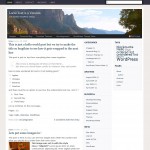
Here is a screenshot of the GreenTrack.
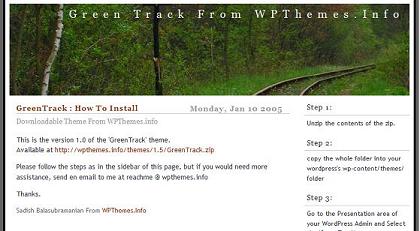
You can see it online at http://playwith.wpthemes.info
Click on the link below to download it and let me know if you face any issues in installing it.
http://wpthemes.info/themes/1.5/GreenTrack.zip
This Theme includes the MainTemplate, Category Template, Date Template, Single Template and Search Template. It also includes a Readme.html to show you how to install it.
You are free to do any customizations and make it your own !
Thanks.
Update 1 :
Fix for the Single.php problem.
Fatal error: Call to undefined function: the_text_category() in /wp-content/themes/GreenTrack/single.php on line 47
Solution:
Please Change the “the_text_category()” to “the_category(’ & amp ;’)”
but no spaces in between & and amp;
Update 2 :
I fixed it in the package itself. You can download the package now to get the fix.
Thanks to the people who reported it, both here and also to my email.
Thanks
[...] LinkyLoo — sadish Here comes the first ever WP 1.5 Theme from WPThemes.Info. GreenTrack Enjoy. &nb [...]
[...] 005
New Theme: GreenTrack
Filed under: Design — Carthik @ 8:43 pm
GreenTrack is a theme that includes a Main Page Template, Category Template, [...]
[...] nwhile, he released another one on his own called Green Track. I love it! Download it from here. This week I got Kat´s late Christamas gifts in the mail. She and Rya [...]
WordPress Theme: GreenTrack
GreenTrack is the first theme released by WP Themes.info….
Im a big fan of your themes because of its simplicty. I hope you release the blue theme as well, and perhaps update your older themes. I would like to use the switcher with these. Really great job! Thanks.
New Theme In Action
I’ve just installed a new theme from WP themes.info called GreenTrack.
I do like the nice clean look, but there are a few things I need to add to make it truly mine. So if you will excuse me I have some costumizations to make….
In the comments, in the block of the right receipt this error:
Archived Entry
Post Date :
Jueves, Ene 6th, 2005 at 11:18 pm
Category :
Fatal error: Call to undefined function: the_text_category() in /home/nidr0x/public_html/wordpress/wp-content/themes/GreenTrack/single.php on line 47
Nice work Sadish, I’ve been using a modified Manji theme for my
site. Manji does not use any menu bar I think I’ll give yours a
try.
thanks for the fix. I thought it was just me getting the error.
This is a very impressive theme. But I wonder if I’m the only one who finds it breaks under IE6. The right column is empty until you scroll a long way down the page. Works fine in Firefox. I wonder if this is because my content has been imported from Movable Type
Yeah its because of the <img > that you have on your content.
IE6 doesnot overflow if the image size is bigger than the
content div.
you may try this :
add the following line into your stylesheet at the end
#content {
overflow:hidden;
}
and see if that solves the problem. if it does, then we would include that as part of the package itself.
Thanks.
Yes! Thanks very much. I thought it had something to do with the MT import…
One other off topic thing I ought to mention – in Firefox this site is set left. In IE it’s centred. Is this deliberate?
Good. But I see both of them as centered.
I dont know why u see it that way. the theme is supposed to be centered in all kind of browsers.
>the theme is supposed to be centered
Strange. Perhaps my installation of Firefox is fouled up somehow. Will uninstall and try again. Thanks again for such interesting work.
Hi,
i love the green track – could you probably give me an idea of our links, contact and archive templates linked on top of your private site or make them public?
Send me an email if you like.
Frank
http://www.blogcounter.de
P.S.: Thanks for the good work
I like the Greentrack and would like to know how to allow my links to appear on the sidebar. Currently, they are hidden.
Hi I have just installed the Greentrack theme and I am wondering how to use the space on the right side where it says “About me?” I am confident that this is for a wordpress page, but I am unable to find how to make the page post to this location. Ideas/hints?
Many, many thanks for making such a beautiful theme available to the public. I am really enjoying the recent release of WordPress 1.5 and look foreword to staying with it for a long time to come.
Thanks again.
Here’s an answer for Anthony (not me… the one above). If you check out my site I’ve got Blogrolls working again. Basically, I just hacked out the get_links_list function from wp_includes/links.php and inserted it into index.php in the template. I changed the name get_links_list2, and edited it to take out <li> element before the <h2> and added a colon. I then just called that function further down in the appropriate location after the search box.
I see Gnimsh has already solved his problem, but for anyone who is wondering: the About Me box can be found in index.php as well. The text can be edited there.
Thanks for the great template!
and what about greentrack v2, where can i download it?
There seems to be a bug in Search with Greentrack for WP1.5. Searching on on the main blog page works fine but if you do an additional search from the search results page it does not work. On my page it kicks me back to my website home page. I’ve tried this in the other themes I have installed and it does not happen. The source code on the results page for the searchbox differs from that on the original page. On the results page after search you see “<form id=”searchform” method=”get” action=”/”>” where on the original page you see “<form id=”searchform” method=”get” action=”/public/wordpress/index.php”>”
Other than that I love this theme! Thanks!
on search.php (line 40) it calls < ?php include "kubrick-searchform.php"; ?> yet, it doesnt come with your files.
no Guillaume, It does come with my package.
Just wanted to say thanks for this theme.
Hi Sadish,
Just installed your Greentrack theme. Lovely! I’m quite happy with it and will not change a lot.
I’ve sent you a mail yesterday, about the non profit thing.
Maybe I can just ask for some help here?
1. Your theme causes the ‘Pages’-header and list in the menubar-top to disappear. Should I remove “About the Site” and “about me” to display the pages?
2. To replace the header-image : What’s the best way to do it? Any advice regarding size? Is a Photoshop image necessary?
3. Can I add a horizontal menu by copying one from another theme and pasting it into index.php?
Thanks for your very nice work!
Bert
Bert,
you can do any kind of cutomizations as you please.
Thanks.
There is another search bug with GreenTrack, if no hits are found, it complains about not finding “kubrick-searchform.php”.
Otherwise, it’s a great theme, I love it!
its a great theme. thanks for sharing it. i am currently using it on my site :).
Sven,
Thanks for reporting the bug. and It is fixed now.
You can download it again.
[...] d it 70% worked, so I’ll have to beat on that later. In the meanwhile, you get the GreenTrack theme – which is pretty nice after a small amount of tweakin [...]
Oops, it didn’t display the code!
Find line 51 in “category.php”, that calls the “wp_list_cats” function… and replace it with the “list_cats” line in GreenTrack’s index.php.
If anyone needs any help, contact me via my site :)
Category.php needs colons adding aswell for the headings “Archives” and “Categories” to reflect those shown on the main page. Minor points :)
Hopefully Sadish will correct this in his release! Thanks!
It’s not showing the static pages (I think that’s a 1.5 feature). Is that right? Or am I missing something?
I tried to modify GreenTrack v1 to look more like v2 and ended up with something different. Either way, thank you for your hard work, I proudly display a product of WPThemes on Danger Stevens.
I’ll be coming here for all my themes.
Victor, there is a fix for static pages on my website, though I still have to get it working with permalinks enabled.
As for the comment by me above, that was supposed to explain how to display the total number of posts in a category, after you select a category (at current the number vanishes when moving from index.php to a category).
this is a nice one. :) it’s on my site for now. i’m using rogue in my images, though, and it’s unfortunate i can’t imagine her on the tracks.
so great, your works. i like it so much.
Like it ! 很喜欢,谢谢!
[...] de so it displays all the stuff you want. Right now, I’m trying to get the hang of GreenTrack from Sadish. It may look purdy, but I’m still trying to unde [...]
Page template!
Hey Sadish,
In the Green Track theme, there’s no Page template. I’ve made one which basically just simplifies the Index page… but without a category and such. You can see it at http://www.iwannabeme.nl/?page_id=267
By the way, isn’t it more practical to separate the sidebar from the index?
[...] awesome theme, but it is by far the most beautiful web blog theme I’ve ever seen. Found it on http://wpthemes.info/posts/2005/01/09/greentrack-first-wp-15-theme , and it’s obviously called “Greentrack”, wich makes sense. The j [...]
Hi Sadish,
I know nothing about php code, please bear with me for my silly questions.
Why the little icon for the comment(s) never appear as it is on http://playwith.wpthemes.info/ ?
And i read about this “graybox” function for “oddcomments” at the comments.php. But it’s not working?
[...] bug reports). As you have probably noticed, a facelift was applied. The site is now using GreenTrack, the first WP 1.5 theme. This theme definitely rocks elegance, if [...]
Thanks for sharing the GreenTrack theme. I love it. It’s so simple and elegant.
Thanks for the theme! I made very few modifications to it (mostly involving page, category, and archive link display with counts), and it looks great!
Very impressive and very simple! I like it very much.
Minor wish: how do I get child categories displayed shifted to the right, so they can differ from parents?
GreenTrack theme
GreenTrack is the theme used on this site (well, most of the time. I go back and forth between that and Plain Vanilla)
I’ve made a few corrections to the PHP. One is an update to the WP 1.5 way of entering / exiting “The Loop” from the WP 1.2 metho…
I really like this theme and am just trying to figure out how to use WP. I was using Movable Type before and got adjusted to that before my host switched us all to WP. Can you help me figure out how to even install this theme so I can use it? Thanks for any help! =)
Hi,
I just wanted to say thank you! I use the theme on my german website. I translated the material. Just mail me, if you are interested. I also changed the header and so on. But the theme is the same, and I am very glad I found it. Some brilliant work!
Nicely done, as your other themes appear to be as well. I feel compelled to tweak almost anything I pick up, as I did GreenTrack, but I simply love the starting point. It’s so perfect for my site I am keeping the image, too. Thank you for your work!
[...] s direcciones para que puedas elegir un buen template para tu blog, el que yo uso es el de Greentrack de wpthemes alexking.org organizo un concurso de t [...]